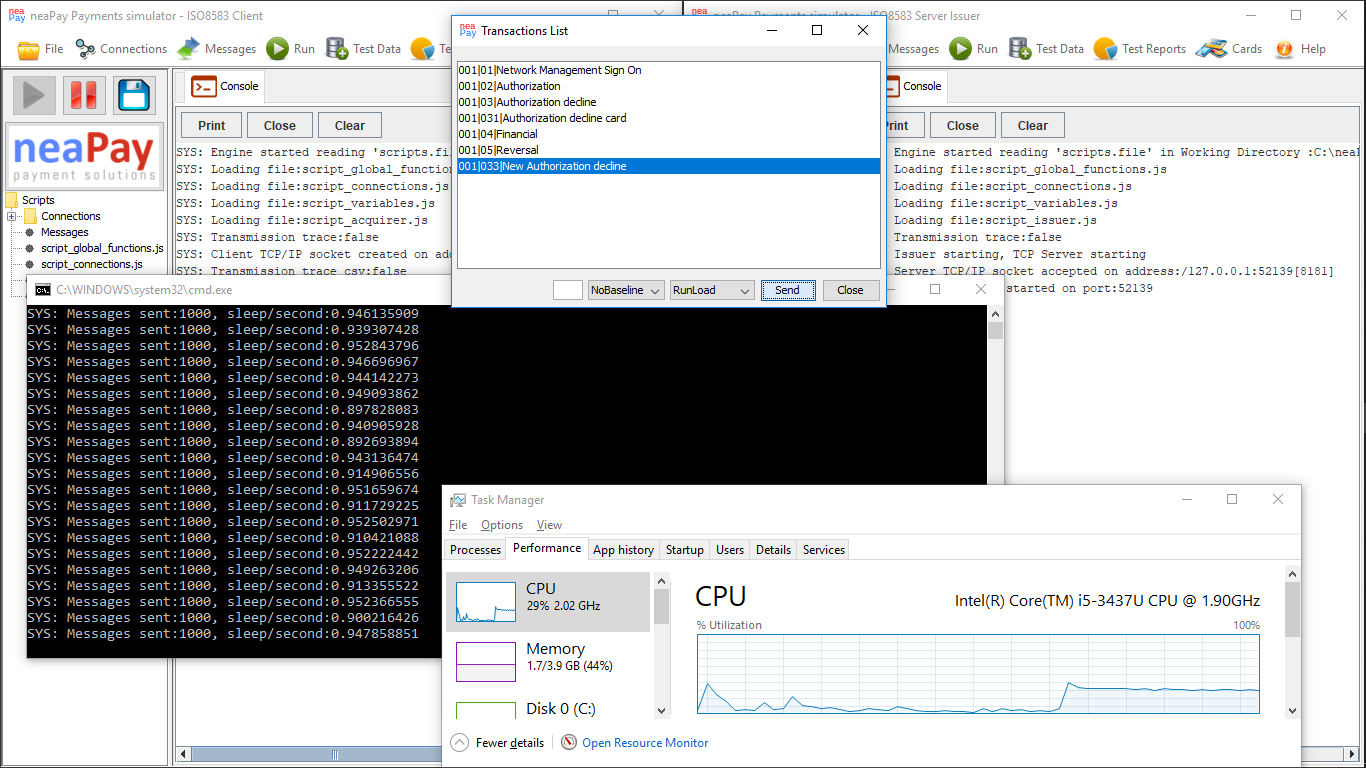
Discover the limits of the neaPay ISO8583 simulator on an OLD entry-level laptop.
First, check the article about moving from functional test to a normal 100 TPS performance test.
Watch this video - running the neapay ISO8583 simulator in Load Test Mode at 500 TPS (transactions per second).
On the neapay ISO8583 simulator 500 TPS is easy. Some customers test way over 1000.
In Load mode, the neapay simulator continuously measures its performance and it shows if it goes over a second in achieving its transactions-per-second rate.
NOTE: Go Download the newest version of neapay ISO8583 Simulator - Performance test, the functionality has increased!
Next step is to try 1500 TPS.
Notice that 1500 TPS is too much for this machine.
When a bottleneck limit is reached, either the system resources are not enough (in this case it is an old CPU with little RAM), but still can push 1000 TPS.
Note that the screen recorder uses a lot of CPU and writes to disk continously; also interfering with the CPU priority.
So we run a test at 1000 TPS with no screen recording.
At 1000 TPS, with no screen recording, it acheives 0.4-0.6 seconds per 1000 transactions. That is on the same 1.9 Ghz 1-core i5 CPU, see a screenshot below.

Conclusion - ISO8583 Performance Testing
For an OLD entry-level laptop, 500 TPS is no problem, for both acquirer and issuer, and even 1000 TPS can be achieved without screen recording running.
Improvements to achieve higher TPS can be done: run on multi-core CPUs, run multiple simulator instances, or at least do not run the Issuer simulator on the same machine :)
Most customers do not need this sort of speed, so we stop with testing at such high speed; However, we always test all our products to guarantee 1000 TPS.