How neaPay ISO8583 Converter Integrates with Kafka
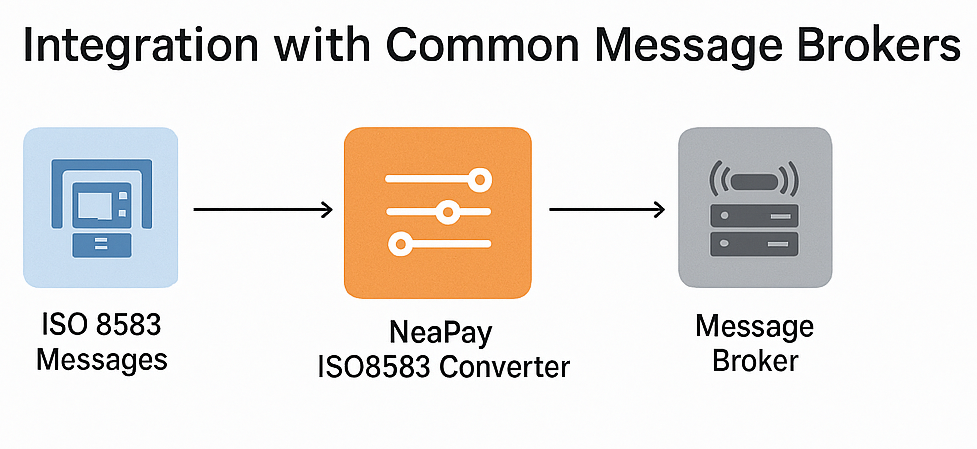
ISO 8583 is a message standard for financial transaction processing (e.g., card payments). Kafka is a distributed event streaming platform. Integration typically involves:
- Message Translation Layer: Convert ISO 8583 messages (binary or ASCII) into a structured format (JSON/Avro) for Kafka topics.
- Producer/Consumer Setup:
- Producer: Reads ISO 8583 messages from a payment switch or socket, parses them, and publishes to Kafka.
- Consumer: Subscribes to Kafka topics, reconstructs ISO 8583 messages, and sends them to downstream systems (e.g., authorization host).
- Schema Registry: Ensures consistent message formats when using Avro or Protobuf.
- Middleware: Often implemented in Java or Python using libraries like jPOS for ISO 8583 parsing and Kafka client APIs.
Use Cases - neaPay ISO8583 kafka Converter
- Real-Time Transaction Monitoring
Stream ISO 8583 transactions into Kafka for fraud detection, analytics, or dashboards. - Decoupling Systems
Payment switch → Kafka → multiple consumers (risk engine, settlement, reporting). - High Availability & Scalability
Kafka handles spikes in transaction volume better than point-to-point integrations. - Data Lake Ingestion
Store ISO 8583 transaction data for historical analysis and compliance.
Difficulties simplified by neapay neaPay ISO8583 kafka Converter
- Binary Parsing Complexity: ISO 8583 messages use bitmaps and variable-length fields; parsing errors can break integrity.
- Latency Sensitivity: Payments require sub-second response; Kafka adds overhead if not tuned properly.
- Message Ordering: Kafka guarantees partition-level ordering, but global ordering is tricky.
- Error Handling & Retries: Duplicate transactions or lost messages can cause financial inconsistencies.
- Security & Compliance: PCI DSS mandates encryption and masking; Kafka must be configured with SSL and ACLs.
- Schema Evolution: ISO 8583 variants differ by network (Visa, MasterCard), making standardization hard.
Here’s how each difficulty can be addressed usingneaPay ISO8583 kafka Converter
:
1. Binary Parsing Complexity
Problem: ISO 8583 uses bitmaps and variable-length fields, making parsing error-prone.
Solution with NeaPay:
- The converter automatically parses and validates ISO 8583 messages according to the correct specification (Visa, MasterCard, proprietary).
- It supports multiple variants and dynamic field definitions, reducing manual coding errors.
2. Latency Sensitivity
Problem: Kafka adds extra hops; payments need sub-second response times.
Solution with NeaPay:
- The converter is optimized for high-speed parsing and serialization.
- It can run as a lightweight microservice close to the payment switch, minimizing latency before publishing to Kafka.
3. Message Ordering
Problem: Kafka only guarantees ordering within partitions, not globally.
Solution with NeaPay:
- The converter can tag messages with transaction IDs and sequence numbers.
- Downstream consumers can use these tags for proper correlation and ordering.
4. Error Handling & Retries
Problem: Duplicate or lost messages can cause financial inconsistencies.
Solution with NeaPay:
- Built-in acknowledgment and reconciliation features ensure message integrity.
- It can log and replay ISO 8583 messages safely without breaking transaction flow.
5. Security & Compliance
Problem: PCI DSS requires encryption and masking; Kafka needs SSL and ACLs.
Solution with NeaPay:
- The converter supports field-level encryption and PAN masking before sending to Kafka.
- It integrates with secure transport (TLS) and can enforce compliance policies.
6. Schema Evolution
Problem: Different networks use different ISO 8583 variants; hard to standardize.
Solution with NeaPay:
- The converter uses configurable templates for each network or institution.
- It can dynamically adapt to new fields without code changes, ensuring smooth schema evolution.
In Apache kafka, an event, a message or record, is an immutable record of something that has happened, such as a user click or an IoT device reading. Events are the fundamental data unit in Kafka and typically contain a key, value, timestamp, and optional metadata headers.
They are published to topics, where they are durably stored in a sequential, append-only log for consumers to process in real-time or for later analysis.
Components of a Kafka event
Key: Identifies the source or context of the event, such as a user ID or a device ID.
Value: Contains the actual data for the event, like the order details or a sensor reading.
Timestamp: Records the exact time the event was produced.
Headers: Optional metadata in key-value pairs that can provide additional information for consumers to use.
How events work in Kafka
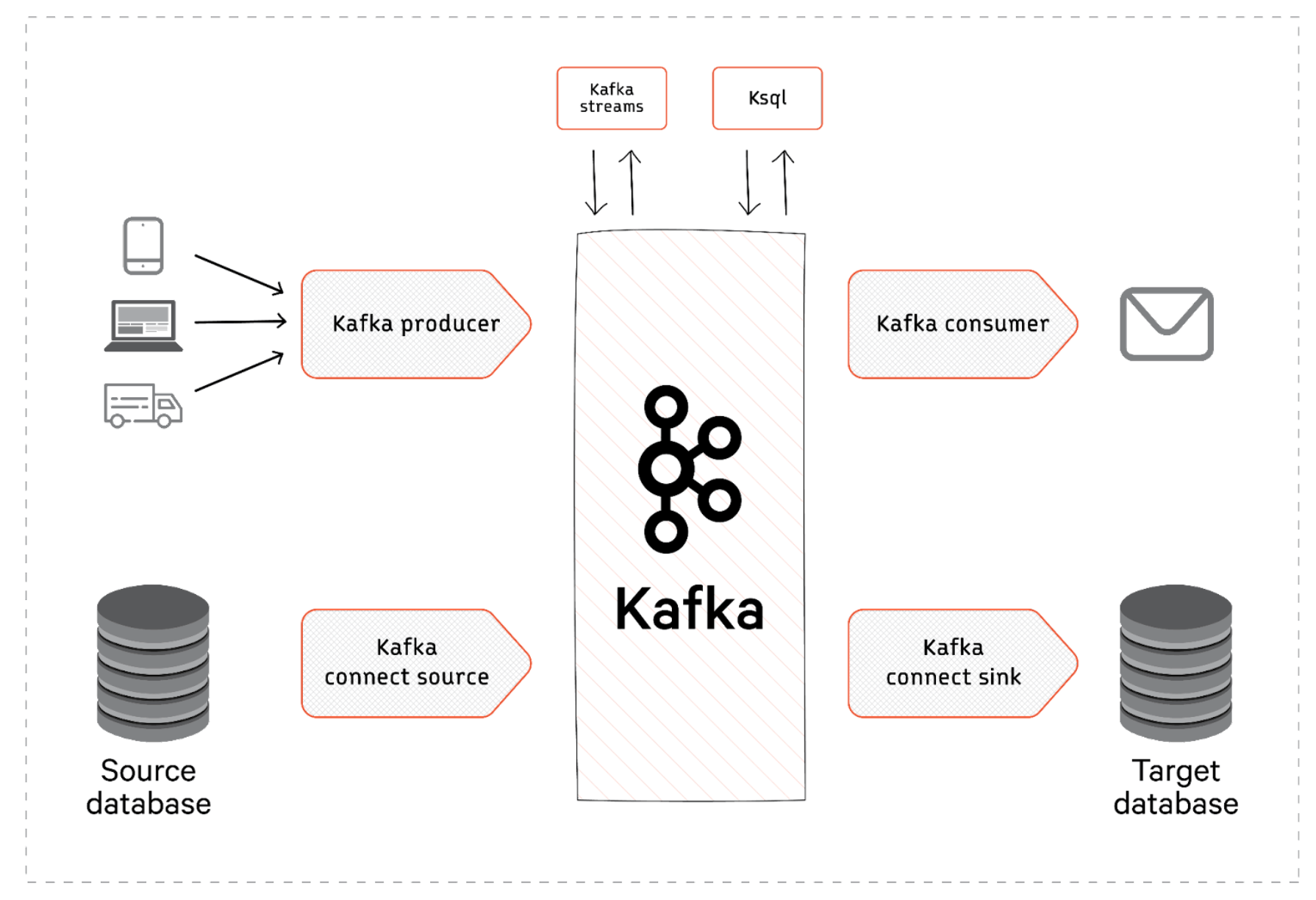
Producers: Applications called producers write events to Kafka topics.
Topics: Events are organized into categories called topics, which act as logs for different types of events (e.g., an "orders" topic).
Partitions: Topics are split into partitions to allow for parallel processing and increased scalability.
Consumers: Applications called consumers read events from topics. They can process events in real-time or re-read events from the log for different purposes.
Immutability: Once an event is written to a topic, it cannot be changed. This creates a reliable and auditable history of what has occurred.
Durability: Kafka stores every event for a configurable period, allowing for reprocessing and historical analysis without data loss, similar to how you can rewatch a movie on Netflix instead of it disappearing after broadcast like live TV.
Examples
E-commerce: An event could be a customer placing an order. Other services can then subscribe to the "orders" topic to fulfill the order, update inventory, and send shipping notifications.
IoT: An event could be a sensor reading from a smart thermostat. The event would contain the device ID (key), the temperature (value), and a timestamp, allowing for real-time monitoring or historical analysis of temperature changes.
Kafka API neaPay ISO8583 kafka Converter
In the dynamic world of real-time data streaming, Application Programming Interfaces (APIs) serve as communication endpoints, facilitating seamless interactions between various software applications. Among these, Apache Kafka®’s API stands out, known for its exceptional capabilities in handling real-time data.
This article explores the inner workings of the Kafka API, examining its types, uses in real-world scenarios, and discussing limitations that arise in specific contexts. We then explore how Red Panda, a robust alternative, aims to overcome these limitations and enhance Kafka's performance.
Summary of Kafka API concepts
We will look at the following topics in this article:
| Producer API | Allows applications to send streams of data to topics in the Kafka cluster. |
| Consumer API | Permits applications to read data streams from topics in the Kafka cluster. |
| Streams API | Acts as a stream processor, transforming data streams from input to output topics. |
| Connect API | Enables the development and running of reusable producers or consumers that connect Kafka topics to existing data system applications. |
| Admin API | Supports administrative operations on a Kafka cluster, like creating or deleting topics. |
| Kafka API use cases | Real-time analytics, event sourcing, log aggregation, message queuing, and stream processing. |
| Kafka API compatible alternative | Redpanda streaming data platform. |
neaPay ISO8583 kafka Converter APIs - an overview
The Kafka API is instrumental in providing a programming interface that allows applications to produce, consume, and process streams of records in real time. It serves as a communication point between the Kafka server and its users and handles real-time data feeds with low latency at scale. These attributes make it a tool of choice for use cases involving real-time analytics, event sourcing, and many other data-intensive operations.
There are five main types of Kafka API, each serving a distinct purpose within the Kafka ecosystem.
Producer API
By converting data into a format suitable for the Kafka broker, the Producer API plays a vital role in data ingestion, ensuring that data streams correctly to the desired Kafka topic.
The following Java code demonstrates how the Producer API sends messages to specific Kafka topics.
Consumer API
The Consumer API extracts data from Kafka. You can subscribe to one or more topics and pull data from them into your application. Here is a simple example of a Kafka Consumer API in Java.
This code creates a Kafka consumer that subscribes to a topic named myTopic. It sets up necessary properties, including bootstrap servers, group IDs, and key/value deserializes. Then it enters an infinite loop where it continuously polls for new records from the topic and prints out the offset, key, and value of each record.
Streams API
The Streams API performs complex transformations and processes by aggregating data or joining multiple streams. For instance, suppose you have a sales data stream and want to compute the total sales per region in real time. This is a job perfectly suited for Kafka Streams.
In KSQL (Kafka's SQL-like stream processing language), the code might look something like this:
In this example, CREATE STREAM defines a stream of sales data. The CREATE TABLE statement creates a new table aggregating this data by region. The result is updated in real-time as new sales records arrive, thanks to Kafka Streams. This is a simple example, but the Streams API is capable of much more complex processing and transformations.
Connect API
The Connect API serves as a bridge between Kafka and other data systems. It is useful when importing or exporting data between Kafka and external systems like databases, log files, or other message queues.
Let us put this into perspective with a brief example. This can be done using Kafka Connect along with a pre-built connector for your database.
In this Java snippet, we are setting up a JDBC source connector to stream changes from a MySQL database into Kafka. We configure the connector with the necessary properties, such as the JDBC connection URL and the column to use for incrementing offsets (in this case, an 'id' column). We then use Kafka Connect's REST API client to add the connector to our Kafka Connect cluster.
Admin API
The Admin API enables effective management of Kafka. For example, you can use it to:
- Create new topics within a Kafka cluster which can then be used for producing and consuming messages.
- Manage user-level permissions, ensuring secure and controlled access to Kafka resources.
- Inspect cluster configurations for effective monitoring and optimization of Kafka resources.
Here's a simple example of how to create a new topic using the AdminClient API in Java:
In this code snippet, we first create an instance of AdminClient which is configured to connect to a Kafka cluster on localhost:9092. Then, we define a new topic with the name myNewTopic, 1 partition, and a replication factor of 1. Finally, we use the AdminClient instance to create the new topic in the Kafka cluster.
neaPay ISO8583 kafka Converter API use cases
Some use cases for Kafka API include:
Real-time analytics
Kafka API is instrumental in powering real-time analytics in various fields. By consuming data streams through the Consumer API and producing result streams through the Producer API, real-time analytics engines provide insights as events occur, aiding in prompt decision-making.
Event sourcing
Event sourcing is a programming paradigm that saves all changes to the application state as a sequence of events. Kafka APIs enhance system traceability and debugging in event streaming. They handle, store, and process large event streams at scale.
Log aggregation
Log aggregation involves collecting and storing logs from various sources in a centralized location. The Producer API sends logs to Kafka, while the Consumer API consumes these logs. Kafka is a centralized, scalable, and reliable log management solution that aids in monitoring and debugging.
Message queuing
In a microservices architecture, services often need to communicate with each other. Kafka API facilitates such interactions by acting as a message broker. Messages produced by one service are consumed by another, allowing for effective inter-service communication.
Stream processing
The Kafka Streams API is used in applications that require continuous computation and manipulation of data streams, such as real-time data transformation, aggregation, or join operations. You can use them in applications like real-time fraud detection, finance, live leaderboards in gaming.